Developers & founders
"I pasted a terminal screenshot into an AI chat with a key still visible."
Catches AWS, GitHub, Stripe, OpenAI, and Slack keys, JWTs, bearer tokens, .env values, and URL tokens — in terminal output, dashboards, and logs.
 Redaktr
On-device screenshot protection for Mac
Before you paste into ChatGPT, Claude, Slack, email, or a support ticket, Redaktr scans locally for secrets, customer data, faces, QR codes, and custom terms, then gives you a clean copy to share.
Who it's for
If your day involves dropping screens into AI chats, Slack, tickets, docs, demos, or email, one careless paste can leak a secret or someone's data. Redaktr is the safety check before that happens.
"I pasted a terminal screenshot into an AI chat with a key still visible."
Catches AWS, GitHub, Stripe, OpenAI, and Slack keys, JWTs, bearer tokens, .env values, and URL tokens — in terminal output, dashboards, and logs.
"I pasted a customer's details into a ticket, email, or chat thread."
Flags names, emails, phone numbers, account IDs, card-like numbers, faces, and QR codes so the screenshot you attach is safe to share internally.
"My personal email and notifications were visible in the tutorial."
Spots the personal identifiers that sneak into demos and build-in-public posts, and fits the screenshot workflow you already use.
"A client's name was sitting in a work-in-progress screen I sent for review."
Add client names, domains, project codenames, and ticket IDs as policy terms — then batch-scan a whole folder of deliverables at once.
How it works
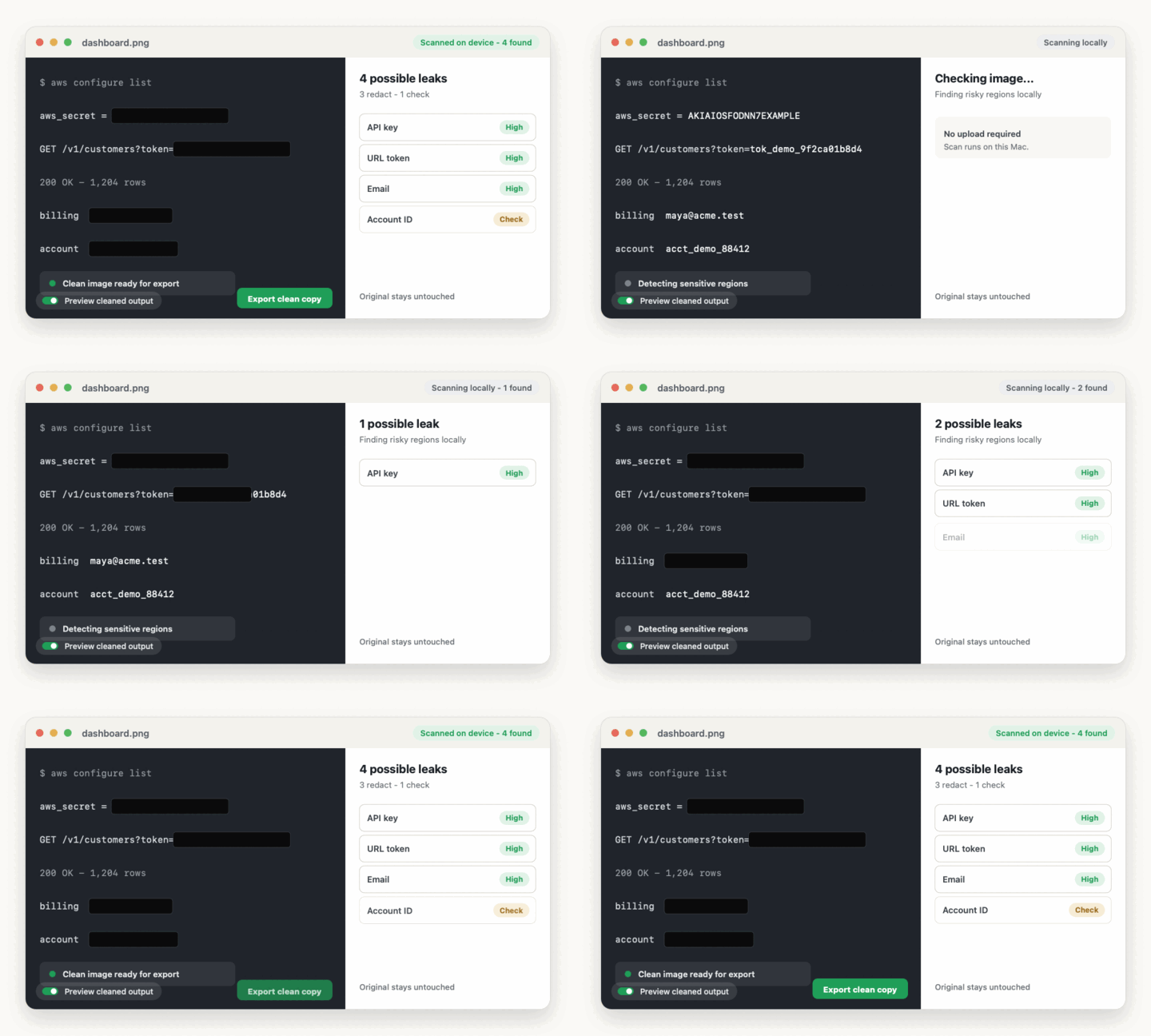
Open, paste, drag, capture with Redaktr, watch a folder, or scan a whole batch. Detection runs automatically — on your Mac.
Every finding is boxed and explained, grouped by type, with a confidence level. Adjust boxes, draw your own, and flip anything between Redact, Check, and Visible.
Preview the exact output, then copy or export a flattened image with metadata stripped for AI chats, Slack, email, support tickets, docs, or demos. The original file is never modified.
What it catches
API keys, access tokens, JWTs, bearer tokens, .env secrets, URL query tokens, and high-entropy strings.
Emails, phone numbers, faces, and card numbers validated with the Luhn check to cut false alarms.
Account and customer IDs, IP addresses, plus customer names, domains, and codenames you add as terms.
QR codes and barcodes that can quietly carry links, tokens, or contact details.
Custom terms, regexes, allowlists, and shareable policy presets for a team's confidential words.
Draw a manual box over whatever the detector missed or you simply don't want shared.
Tight, substring-level boxes cover the exact email or token — not the whole line. Detection can still miss things, so Redaktr always asks you to review before sharing.
Protection modes
The focused path for one screenshot before you send it.
Scan a folder of images and jump straight to the ones with findings.
Watch your Desktop or Screenshots folder and scan new images right after they're saved.
Notice a risky image on the clipboard and offer a cleaned copy before you paste it into ChatGPT, Claude, Slack, email, tickets, or docs.
Capture a screen, window, or area with Redaktr-owned hotkeys. Auto-output copies or saves only when findings are confident; uncertain Check findings open review.
Share local .redaktrpolicy files for customer names, domains, codenames, confidential labels, regexes, and allowlists.
Privacy by design
Redaktr is sandboxed and detection runs entirely on-device. There's no account to create and nothing to upload — the whole point is that the sensitive screenshot content stays with you.
Pricing
Start with a 14-day free trial. After that, Redaktr is a one-time purchase with unlimited duration for up to three Macs. No subscription. Developer ID signed and notarized.
Guides
Use these guides for the exact moments Redaktr is built around: AI screenshot sharing, API key screenshots, offline PII redaction, support tickets, and safer Mac screenshot habits.
Find tokens, secrets, URL credentials, and high-entropy strings before sharing terminal or dashboard screenshots.
Clean customer data, emails, phone numbers, faces, account IDs, and policy terms with no screenshot upload.
Why opaque, flattened redaction is safer than blur or pixelation for sensitive data.
Prepare screenshots for support tickets, Slack threads, email, and internal docs without leaking customer context.
Keep your screenshot tool and add Redaktr as a local detection and safe-export layer.
A step-by-step Mac screenshot cleaner workflow for AI, Slack, support, docs, demos, and public posts.
FAQ
Keep them. They're great at capturing and editing. Redaktr is the detection-and-safe-export layer — it watches or imports what those tools produce and catches the sensitive content they don't look for.
No. Detection and redaction run on your Mac. Images are never sent anywhere.
No. Redaktr copies or exports a separate cleaned image and leaves the source file untouched.
No tool can promise that, and Redaktr won't pretend to. It biases toward catching high-stakes things like keys and tokens, shows you why each was flagged, and asks you to review before sharing.
No. Redaktr does not integrate with or monitor those apps. It protects the screenshot or image before you share it by scanning locally and giving you a cleaned copy.
Redaktr matches visible labels and the terms, domains, and regexes you configure. It doesn't claim to semantically understand what's confidential — you teach it your words.
Only what a feature requires: Screen Recording for built-in capture, and access to a folder you choose for batch scanning or folder watch. Nothing runs behind your back.
Contact
Product improvement ideas, team policy needs, licensing questions, pilots, or a detector that missed something on your screenshots? I'd like to hear it.